Learn, then practice
Meet the pronouns, learn to read Arabizi, and work through four short tense lessons. Then practice by choosing, typing, or listening, with as much guidance as you like.
Lebanese, and part of the Levant
Lebanese is the everyday Arabic of Lebanon, part of the Levantine family also spoken in Syria, Jordan, and Palestine. Local words and pronunciation vary; ShuFee focuses on Lebanese forms.
A little quiz.
A little Lebanese.
How do you say “I drink,” “you drink,” and “we drink”? Try three present-tense forms from ShuFee, right in the app. No account needed.
Switch between Arabizi and Arabic on the phone. Lebanese forms of Levantine Arabic; Arabizi spelling varies. This web sample uses text; pronunciation audio is included in the app.
How would you say it?
That’s a taste. In ShuFee, hear every form, practice by listening or typing, and choose the tenses and pronouns you want to master.
Keep practicing, get ShuFeeFind your way to fluent verb forms.
Focused practice, short lessons and offline audio. Now with English, French and Brazilian Portuguese instructions and translations. Take a look inside.
One tap to start.
A calmer home with one big Start button, your day at a glance, and four simple tabs: Practice, Learn, Verbs, and Progress. Settings live in one place, behind the gear.

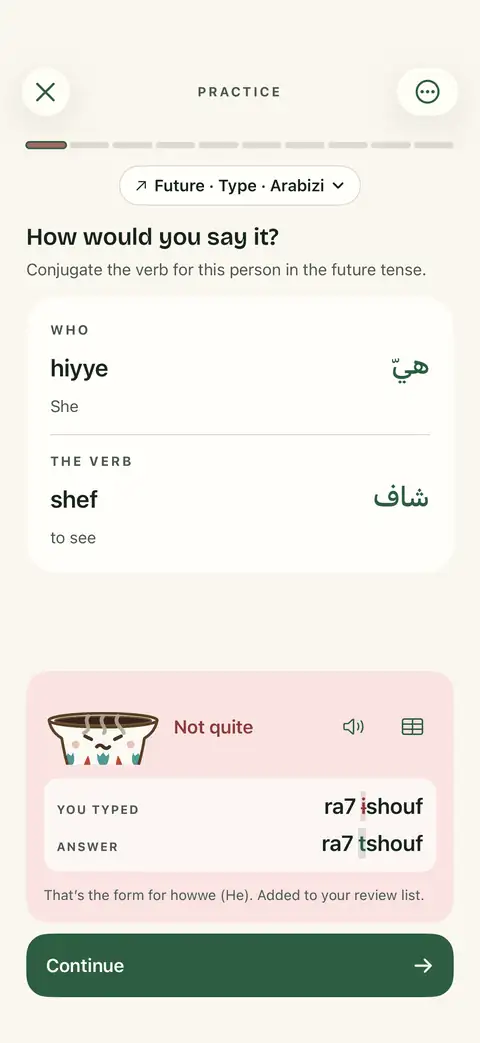
Mistakes that teach.
See exactly which letters changed between your answer and the right form. Wrote another person’s form by mistake? ShuFee tells you whose it was. The little coffee cup cheers when you’re right, and droops a bit when you’re not.
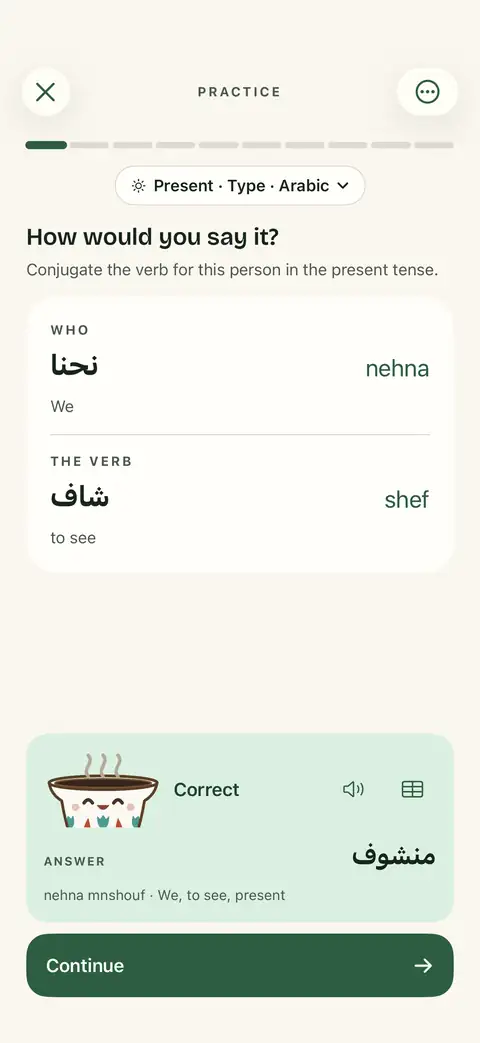
Arabic you can really read.
Arabic script is larger and bolder, so it sits comfortably beside Arabizi. Show or hide vowel marks, and when you practice in Arabic, the Arabic keyboard opens by itself.
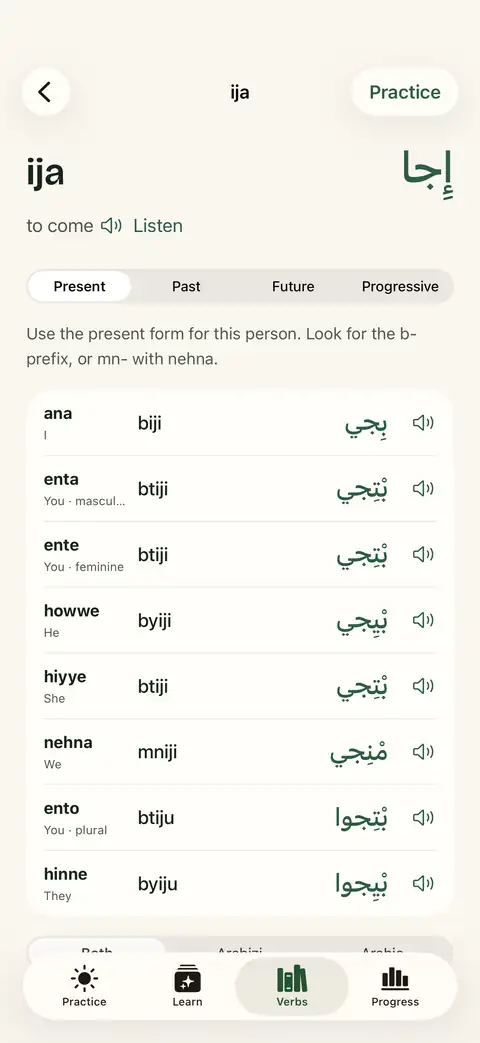
Hear every form.
Lebanese pronunciation for every verb form, pronoun, and lesson phrase. Choose Fadi, Jasmine, or both. Press and hold to slow it down. It all works offline.
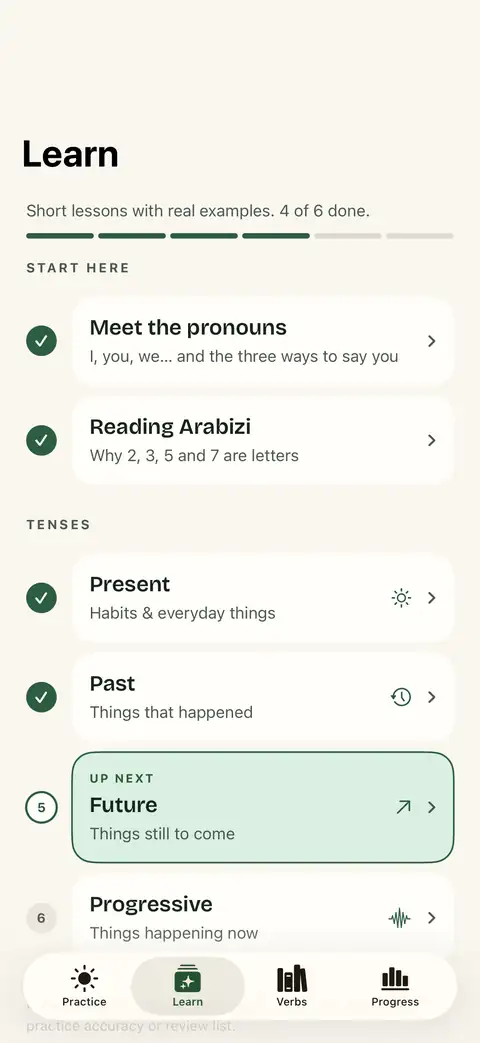
Little lessons, one step at a time.
Meet the pronouns, learn to read Arabizi, then take short lessons on each tense with real examples. One clear “Up next” shows you where to go.
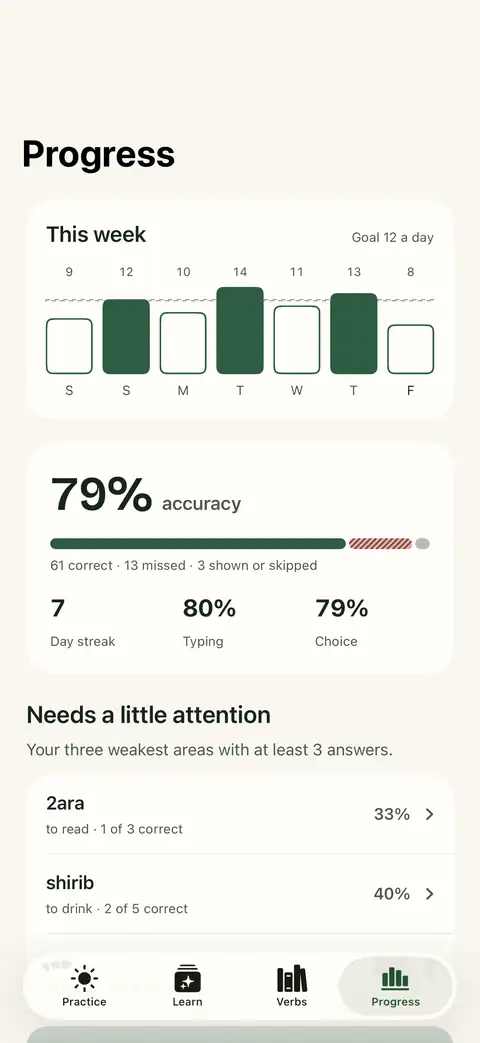
See your week.
Set a daily goal, watch your week fill in, and let ShuFee pick the three areas that need a little attention, ready to practice in one tap.
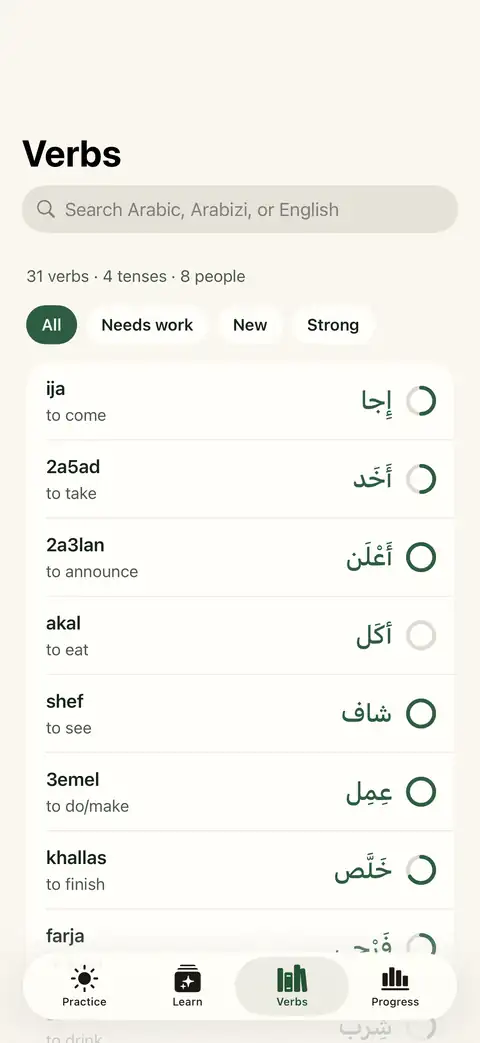
70 everyday verbs.
From come and go to learn, work, cook, give, say, and forget, with 2,240 conjugated forms to practice. Search in Arabic or Arabizi, or by meaning in English, French or Brazilian Portuguese.
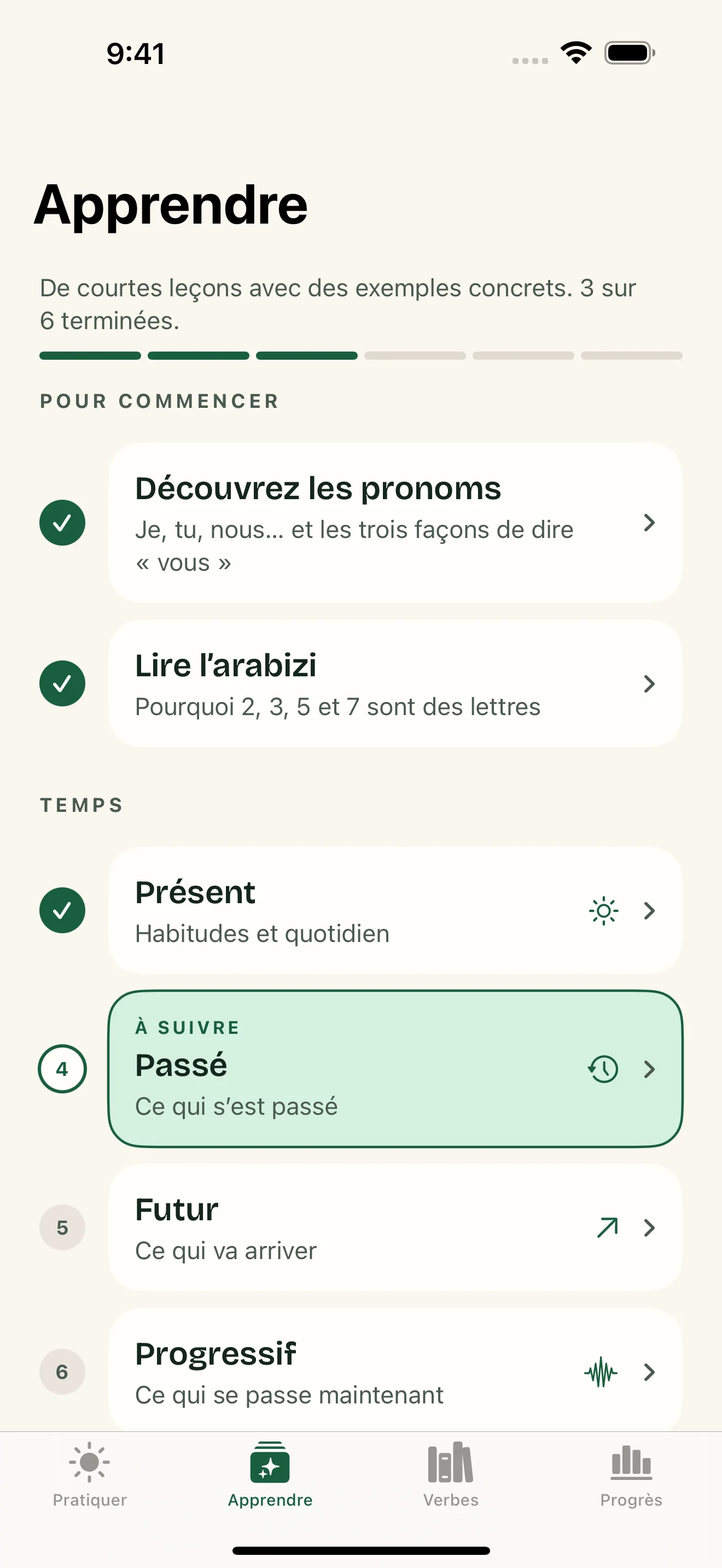
A little Lebanese, in French.
Follow the lessons and instructions in French, look up verb meanings, and read all 140 translated example sentences. The Arabic, Arabizi and Lebanese audio stay at the heart of your practice.
Your language. Your progress.
Brazilian Portuguese is here too. Choose English, Français or Português (Brasil) on the welcome screen or in Settings. Change languages any time: your progress and unfinished practice session stay with you.
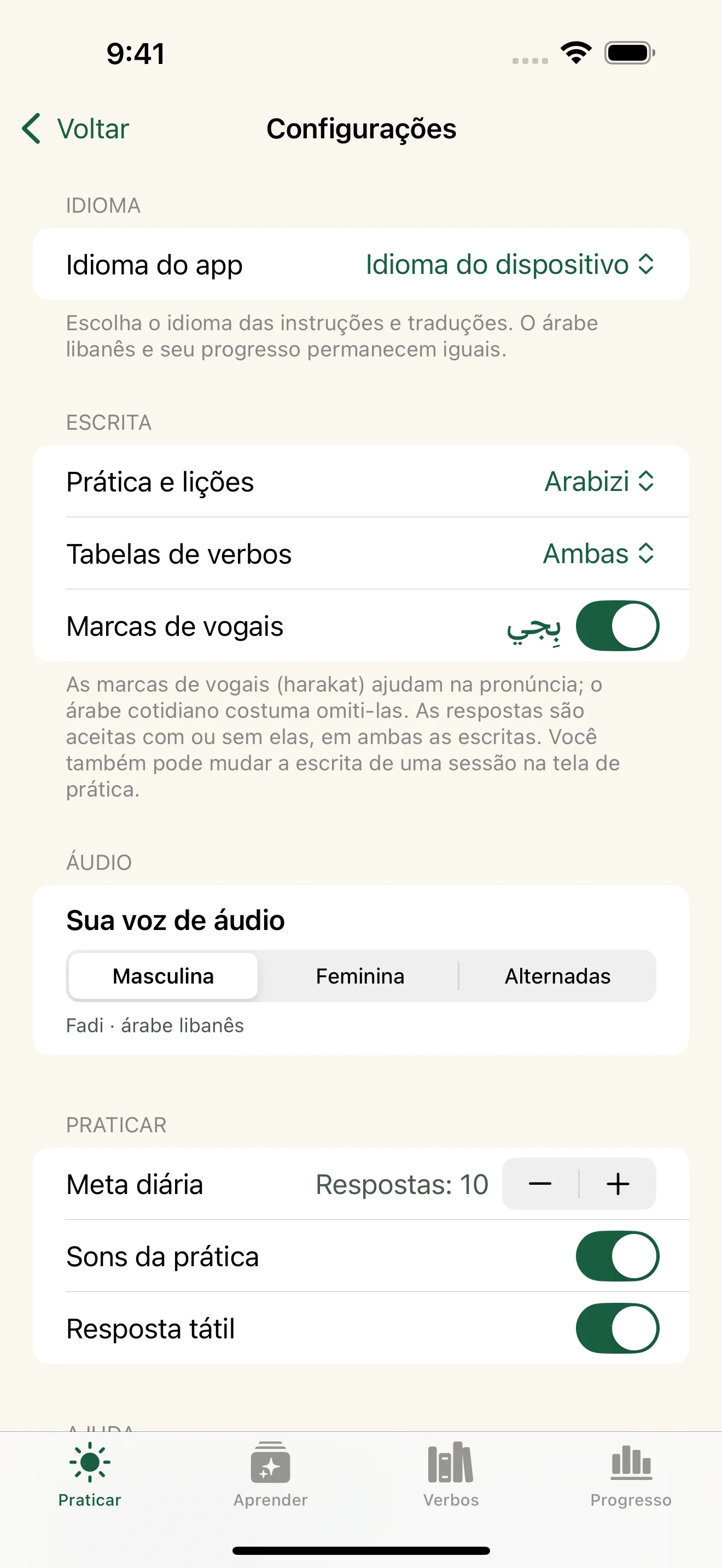
Home shows the free experience; other screenshots illustrate the full collection and four-tense lessons. English, French and Brazilian Portuguese are available in the free version. Full Access is a one-time in-app purchase. Progress shown is example data.
Your first forms,
on the house.
ShuFee is free to try with 12 everyday verbs in the present tense. Type, choose or listen as much as you like, with both voices and all eight pronouns. When you’re ready, one purchase unlocks all 70 verbs and four tenses on iPhone and iPad. No subscription, no trial deadline.
Free to try
Practice 12 present-tense verbs for free, with unlimited sessions, both voices, both scripts, progress and review.
Lessons in your language
Read translated explanations, instructions and verb meanings, from your first pronouns to all four tenses.
140 example sentences
See each of the 70 verbs in context, with two example sentences and translations in all three languages.
Search by meaning
Find a verb by its meaning in English, French or Brazilian Portuguese, or search in Arabic and Arabizi.
Already bought ShuFee?
Full Access is included for previous paid-app owners. Use the same Apple Account so ShuFee can verify your original purchase. Restore purchases is available in Settings.
Still Lebanese. Still offline.
Practice the same Lebanese forms in Arabic script or Arabizi, with bundled Fadi and Jasmine pronunciation audio.
A little help.
Questions, a spelling suggestion, or something not working? Get in touch.
Email ShuFee supportshufee.app@gmail.com · Include your app version, device model, and a brief description of the issue. Please avoid sending passwords or other sensitive information.
What can I try for free?
The free download includes 12 everyday verbs in the present tense, all eight pronouns, unlimited Type, Choose and Listen practice, both scripts and both voices, plus progress and review. There is no trial deadline. A one-time Full Access purchase unlocks the 70-verb collection and all four tenses; the App Store shows your local price. No subscription.
I already paid for ShuFee. Do I need to buy it again?
No. Previous paid-app owners get Full Access included. Open ShuFee using the same Apple Account that bought it, with an internet connection for the initial purchase check. Access is then saved on your device for offline use. If needed, choose Restore purchases in Settings. If access does not appear, contact support.
How do I change the app language?
ShuFee 3.4 supports English, French and Brazilian Portuguese. Choose a language on the welcome screen, or open the Practice tab, tap the gear for Settings, then choose App language. Select English, Français or Português (Brasil), or use Device language to follow your device’s supported language preferences. Your practice history, lesson progress and unfinished session are preserved. The language you are learning remains Lebanese Arabic, with the same Arabic script, Arabizi and pronunciation audio.
Where should I start?
Open Learn: start with Meet the pronouns and Reading Arabizi, then take the short lessons on present, past, future, and progressive forms. “Up next” always shows the next step. When you’re ready, tap Start practicing on the Practice tab. A short overview runs the first time, and you can replay it from Help in Settings (the gear on the Practice tab).
Can I practice without typing?
Yes. In a practice session, tap the pill at the top (for example “Present · Type · Arabizi”) to switch between Type, Choose, and Listen, and between Arabic and Arabizi. Choose gives you answer options; Listen lets you hear a pronoun and pick its form.
How do I choose what to practice?
On the Practice tab, tap Your practice to pick tenses, pronouns, a single verb, and the session length. On Progress, “Needs a little attention” builds a focused set from your weakest areas in one tap.
What happens when I get one wrong?
ShuFee highlights the letters that differ and, if you wrote another person’s or tense’s form, tells you whose it was. The form goes to your review list. Tap Review on the Practice tab to try missed forms again, in the same mode you missed them.
Why was my spelling accepted, or shown differently?
Arabizi uses Latin letters and numbers and has no official spelling standard. ShuFee accepts common variations, such as kh or 5, ch or sh, and ee or i, and shows the spelling it uses. It never accepts a form that belongs to a different person or tense. Spellings follow Lebanese and Levantine conventions.
How does pronunciation audio work?
Tap the speaker icon beside a verb, pronoun, or lesson example. Press and hold for slower playback. Choose Male (Fadi), Female (Jasmine), or Mixed in Settings, the gear on the Practice tab. The same audio works with Arabic and Arabizi, and no internet connection or microphone access is needed.
How do I use Listen practice?
In a session, tap the pill at the top and select Listen. The written pronoun stays hidden until you choose an answer or tap Show pronoun. Replay has no scoring penalty; revealing the pronoun marks your answer as assisted. A correct answer moves on by itself; after a miss, tap Continue when you’re ready.
How do I read and type in Arabic script?
In Settings, set Practice and lessons to Arabic, and choose Arabizi, Arabic, or both for verb tables. Turn Vowel marks on or off to show or hide harakat. When you practice in Arabic, ShuFee opens the Arabic keyboard automatically if it’s installed; add it in your iPhone’s Settings › General › Keyboard › Keyboards. Answers are accepted with or without vowel marks.
How much content is included?
Full Access includes 2,240 forms across 70 verbs, eight pronouns, and four tense patterns, plus 140 example sentences. The free download includes 12 verbs in the present tense. Lessons, instructions, verb meanings and example translations are available in English, French and Brazilian Portuguese.
How do I turn off sounds or haptics?
Use the Practice sounds and Haptic feedback switches in Settings, where you can also set your daily goal. Practice sound effects respect your device’s Silent mode. Pronunciation playback and Listen practice use spoken audio that can play with Silent mode on.
Where is my progress?
Practice history, review items, lesson progress, and preferences are stored locally on your device. ShuFee does not provide its own account or cloud-sync service. Removing the app may remove this progress.
Your practice is yours.
ShuFee privacy policy
Updated October 23, 2026 · Applies to ShuFee 3.4 for iPhone and iPad.
Information in the app
ShuFee does not require an account and does not collect or transmit your practice answers, scores, lesson progress, or preferences to the developer. These records are saved locally using Apple’s device storage. The app contains no advertising or third-party analytics services.
Pronunciation audio
Audio files are generated during app development and bundled with the app. Listening does not send your answers or other data to the voice provider. ShuFee does not record your voice or request microphone access.
Purchases and access
Apple handles purchases and restoration through the App Store. ShuFee uses Apple StoreKit to verify Full Access and an earlier paid-app purchase, then saves access status locally for offline use. Purchase data is not sent to the developer’s own server. Apple’s services and privacy policies govern App Store transactions.
Your choices
You can change sound and haptic preferences in the app. Removing the app removes its local data, subject to any backups managed by your device or Apple. Device backups and App Store purchases are governed by Apple’s services and privacy policies.
Support messages
If you email support, we receive the email address and information you choose to send. We use this information to respond to your request and resolve the issue. You can request deletion of support correspondence by contacting shufee.app@gmail.com, subject to any records we must retain.
This website
This support site uses no advertising, analytics scripts, or tracking cookies, and loads no third-party fonts or scripts. The mini-quiz runs in your browser; answers and scores are not saved or sent to us. It is hosted on GitHub Pages. GitHub may process technical information, such as IP addresses, to operate and secure its hosting service. See GitHub’s privacy statement. Following an external link or sending email is subject to the relevant service provider’s practices.
Children and changes
The app does not knowingly collect personal information from children. If a child sends personal information in a support message, contact us to request its deletion. Any changes to this policy will appear here with an updated effective date.
Contact
For privacy questions, email shufee.app@gmail.com.